This project simulates the full lifecycle deployment of an enterprise vulnerability management program.
Initial State: The organization possesses no existing vulnerability management policies, procedures, or remediation practices.
Final State: A comprehensive vulnerability management policy is formally adopted, executive and departmental stakeholder alignment is achieved, and a complete organization-wide vulnerability assessment and remediation cycle is successfully executed.

- Tenable (enterprise vulnerability management platform)
- Azure Virtual Machines (Nessus scan engine + scan targets)
- PowerShell & BASH (remediation scripts)
- Vulnerability Management Policy Draft Creation
- Mock Meeting: Policy Buy-In (Stakeholders)
- Policy Finalization and Senior Leadership Sign-Off
- Mock Meeting: Initial Scan Permission (Server Team)
- Initial Scan of Server Team Assets
- Vulnerability Assessment and Prioritization
- Distributing Remediations to Remediation Teams
- Mock Meeting: Post-Initial Discovery Scan (Server Team)
- Mock CAB Meeting: Implementing Remediations
- Remediation Round 1: Outdated Wireshark Removal
- Remediation Round 2: Insecure Protocols & Ciphers
- Remediation Round 3: Guest Account Group Membership
- Remediation Round 4: Windows OS Updates
- First Cycle Remediation Effort Summary
This phase centers on developing an initial Vulnerability Management Policy to initiate stakeholder discussions. The draft covers key elements like scope, roles and responsibilities, and remediation deadlines, with potential revisions based on departmental input to ensure feasibility prior to executive approval.
During this phase, the draft Vulnerability Management Policy is presented to the server team in a dedicated meeting to evaluate their ability to comply with remediation deadlines. Their input prompts adjustments, such as extending the critical remediation timeframe from 48 hours to one week, fostering collaborative and realistic implementation.
Participants: Alexander (Security Lead), John (Operations Lead)
Alexander: Good morning, John. How have things been going lately? I realize the last few weeks have been pretty packed for everyone.
John: Morning, Alexander. It’s definitely been busy, but we’re managing, thanks. I reviewed the draft policy and the overall approach looks solid. That said, with our current team size we won’t be able to consistently hit those tight remediation deadlines, particularly the 48-hour requirement for critical issues.
Alexander: I hear you, and I agree the timelines are pretty aggressive for an initial rollout. Maybe we extend the target for critical findings to one week for now. We could reserve the 48-hour turnaround for truly severe cases, like high-impact zero-day vulnerabilities.
John: That sounds workable. We really appreciate the willingness to adjust. Could we also have some flexibility at the start while we get familiar with the new remediation and patching workflow, at least for the first few months?
Alexander: Definitely. Once the policy is signed off, we’ll formally launch the program, but the idea is to give each department around six months to ramp up and adapt to the new procedures. Does that feel reasonable on your end?
John: Thanks, Alexander, we’ll put in our best effort. I really value being involved in the decisions; it makes the team feel like we’re contributing to the solution instead of just having rules handed down.
Alexander: Absolutely. We’re all working toward the same goal here.
John: And thanks again for collaborating with us on this.
Alexander: My pleasure. I appreciate you taking the time for a quick check-in.
John: Same here—short meetings are the best. Talk to you later.
Alexander: See you, John.
Following server team feedback, the policy undergoes revision to accommodate more realistic remediation timelines. Once upper management provides final approval, the updated policy serves as the program's authoritative framework, ensuring consistent compliance and providing clear guidance for resolving implementation challenges.
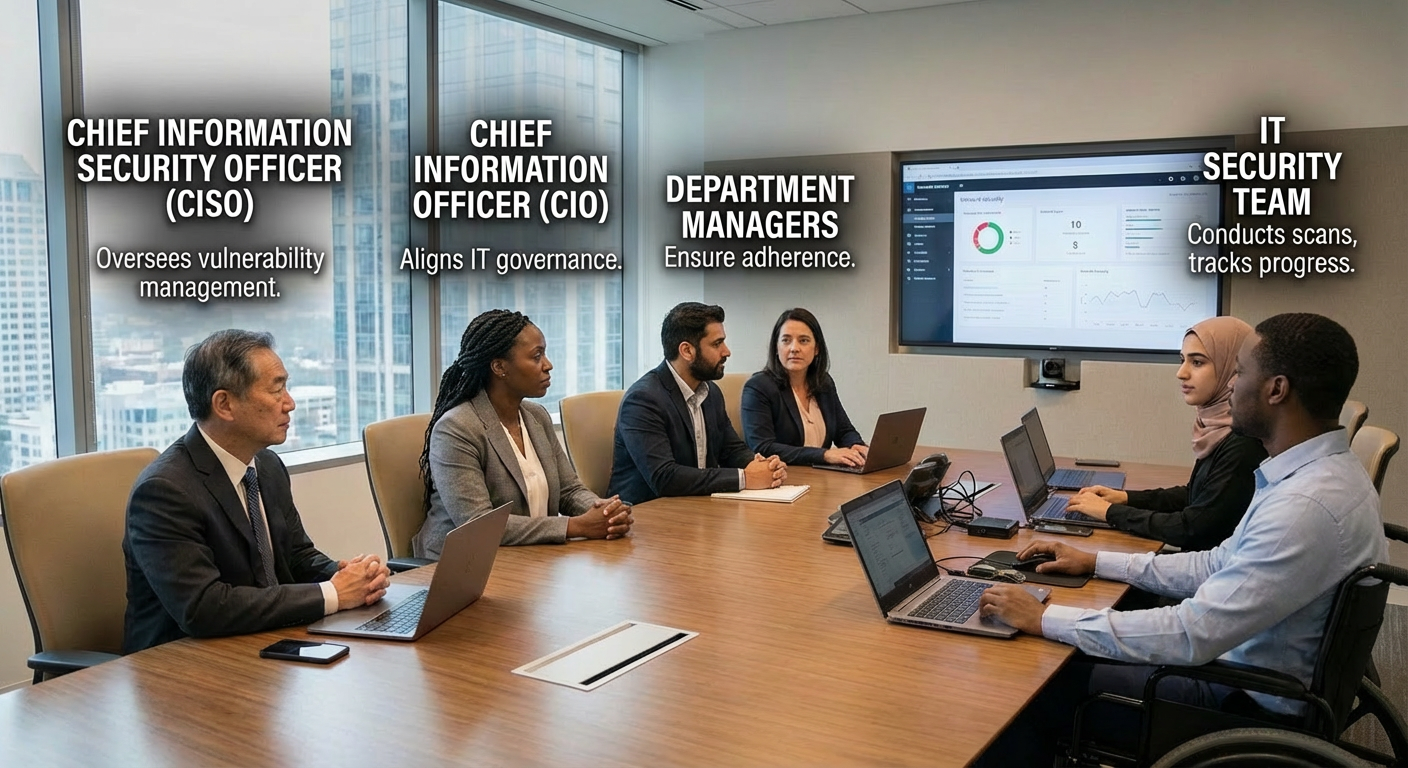
The server team works collaboratively to launch scheduled credential-based vulnerability scans. They agree to a phased approach—starting with one server to monitor resource usage—while employing just-in-time Active Directory credentials for secure, controlled access.
Participants: Alexander (Security Lead), John (Operations Lead)
Alexander: Good morning, John. I heard you're ready to kick off some scans now that our vulnerability management policy is finalized.
John: Morning, Alexander. Yep, we're set to begin. What exactly is involved, and how can we support this?
Alexander: We're scheduling weekly scans of the server infrastructure. It should take about 4-6 hours to cover all 200 assets. We'll need administrative credentials so the scan engine can log into the targets remotely for a thorough assessment.
John: Hold on—what does the scanning process actually do? I'm concerned about server resource usage, and handing over admin creds to all 200 machines feels risky.
Alexander: Those are fair points. The scanner sends targeted traffic to detect vulnerabilities, like checking the registry for outdated software, insecure protocols, or weak cipher suites. That's why privileged access is needed for deeper visibility.
John: Got it. As long as it won't take servers offline, we should be fine. Let's start with just one server to monitor resource impact first.
Alexander: Smart approach. For credentials, can we create temporary Active Directory accounts? Keep them disabled until scan time, enable just-in-time, then disable or deprovision afterward.
John: Perfect—that's a just-in-time access model we like. I'll have Susan start automating the account provisioning.
Alexander: Great. I'll follow up once credentials are ready.
John: Sounds good. Talk soon.
Alexander: See you later.
In this phase, a deliberately vulnerable Windows Server is deployed to replicate the server team's production environment. Vulnerabilities are intentionally introduced, followed by an authenticated vulnerability scan, with results exported for subsequent remediation tracking.
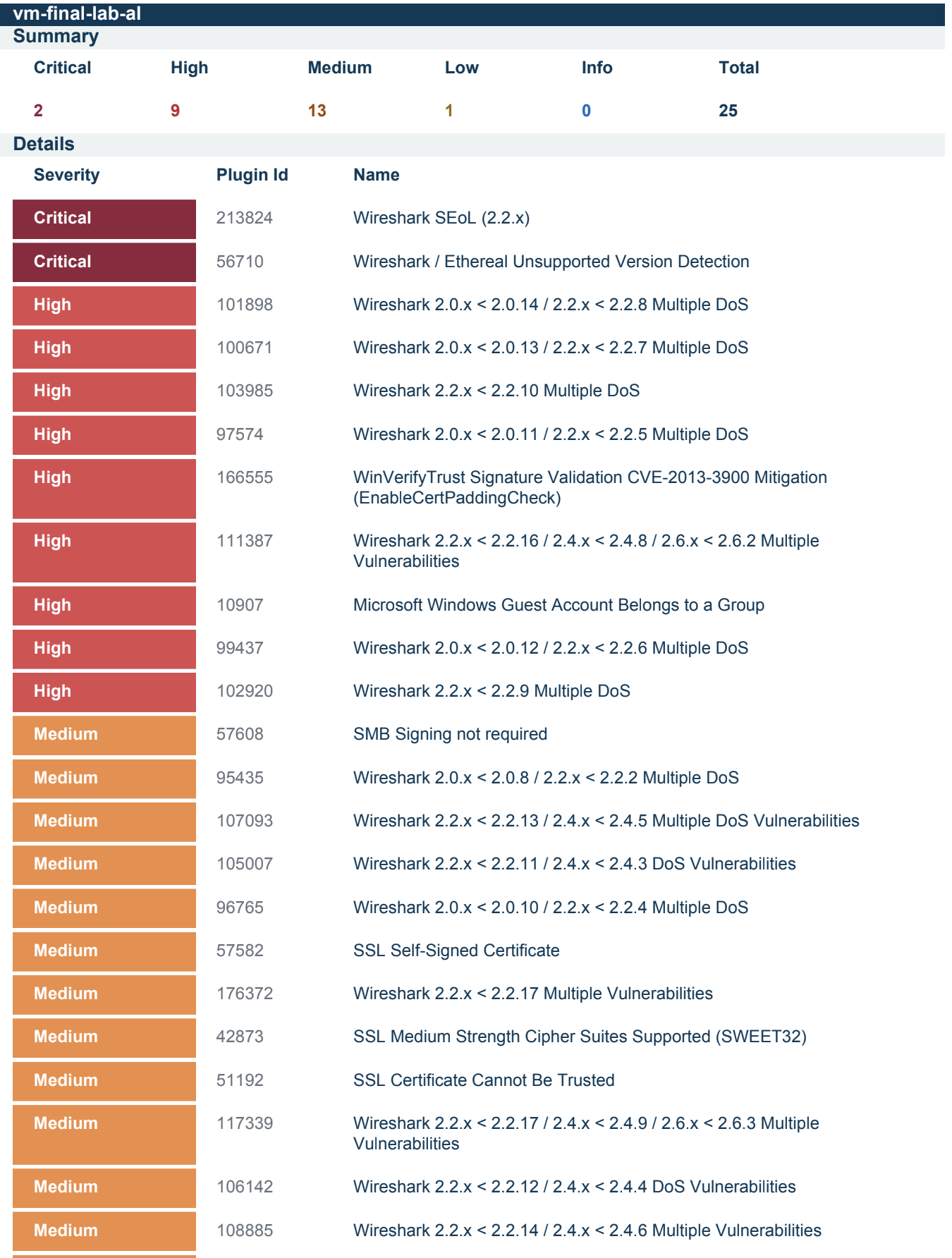
We evaluated identified vulnerabilities and developed a remediation plan that prioritizes actions based on their potential impact and the level of effort required to address them. The following order of priority was defined:
- Removal of third-party software (e.g., Wireshark)
- Securing Windows OS configuration (protocols and cipher settings)
- Securing Windows OS configuration (guest account group membership)
- Applying Windows OS updates
The server team received remediation scripts and scan reports to address key vulnerabilities. This streamlined their efforts and prepared them for a follow-up review.

The server team analyzed the vulnerability scan findings and identified outdated software, insecure account configurations, and deprecated protocols. Remediation packages were then developed and prepared for submission to the Change Control Board (CAB).
Participants: Security Analyst (Alexander), Server Team Lead (Jimmy)
Alexander: Morning Jimmy, how's it going? Not bad for a Monday. Jimmy: Doing alright. Still breathing, so no complaints.
Alexander: Before we dive into the vulnerability findings, how did the scan impact your side? Any outages, resource spikes, or issues? Jimmy: Scan went smoothly. We monitored closely, and aside from the expected open connections, you'd never know it was running.
Alexander: Great to hear. We'll keep monitoring, but I don't anticipate resource problems moving forward. Mind if I walk through the findings? Jimmy: Go for it.
Alexander: [Shares screen] Most vulnerabilities trace back to outdated Wireshark installations—everything Wireshark-related is severely out of date. One key issue: the local Guest account on servers is added to the Local Administrators group, which shouldn't happen. Some others, like the Microsoft Edge Chromium issue, should auto-resolve with Windows updates. The self-signed certificate is just the system's own, so no concern there.
Alexander: But these medium-strength cipher suites, plus TLS 1.0/1.1—they're deprecated protocols we need to address.
Jimmy: Interesting. Good news is our servers likely share the same profile, so remediation should be consistent. Alexander: Uniform vulnerabilities actually simplify fixes. Any roadblocks you foresee, especially with cipher suites or insecure protocols? Jimmy: None expected. Wireshark uninstall and Guest account removal go through next Change Control Board—no issues, since they shouldn't be there anyway. I'll check with our CISO admins on the Guest account.
Alexander: Perfect. I'll prepare remediation packages to streamline your fixes. Do you have patch management for Windows update-related items? Jimmy: Yes, fully automated. Updates roll out next week automatically. Alexander: Excellent. I'll research optimal remediation steps and circle back before the next Change Control Board. Jimmy: Sounds good. Talk soon.
The Change Control Board (CAB) evaluated and approved the proposal to eliminate insecure protocols and cipher suites. The strategy incorporated a rollback script and a phased deployment methodology.
Participants: Change Control Board Members, Nick (Risk Department), Jimmy (Infrastructure)
Chair: Next on the agenda: two vulnerability remediations for the server team. First, removal of insecure protocols; second, removal of insecure cipher suites. Nick from Risk and Jimmy from Infrastructure are collaborating. Jimmy, want to cover the technical details?
Jimmy: Normally I'd handle it, but could Nick take this? He developed the solution—we're still ramping up on the process.
Nick: Happy to explain. Insecure cipher suites and protocols mean the system can still negotiate deprecated algorithms or protocols. If it connects to a legacy server that only supports them, it might use them—posing a risk. These are managed via Windows Registry settings.
Nick: The fix is straightforward: a PowerShell script that disables all insecure protocols/ciphers and enables current secure standards.
Chair: Sounds simple. But what if issues arise? Rollback plan? Did you consider that?
Nick: Absolutely. We're using tiered deployment: pilot group (small set), pre-production, then full production. Plus, each script includes a built-in, tested automated rollback that restores original settings if problems occur.
Chair: Registry changes seem low-risk. Not too concerned. Any other questions?
Chair: Great. That concludes this week's Change Control Board. See everyone next week.
The server team used a PowerShell script to remove outdated Wireshark. A follow-up scan confirmed successful remediation.
Wireshark Removal Script
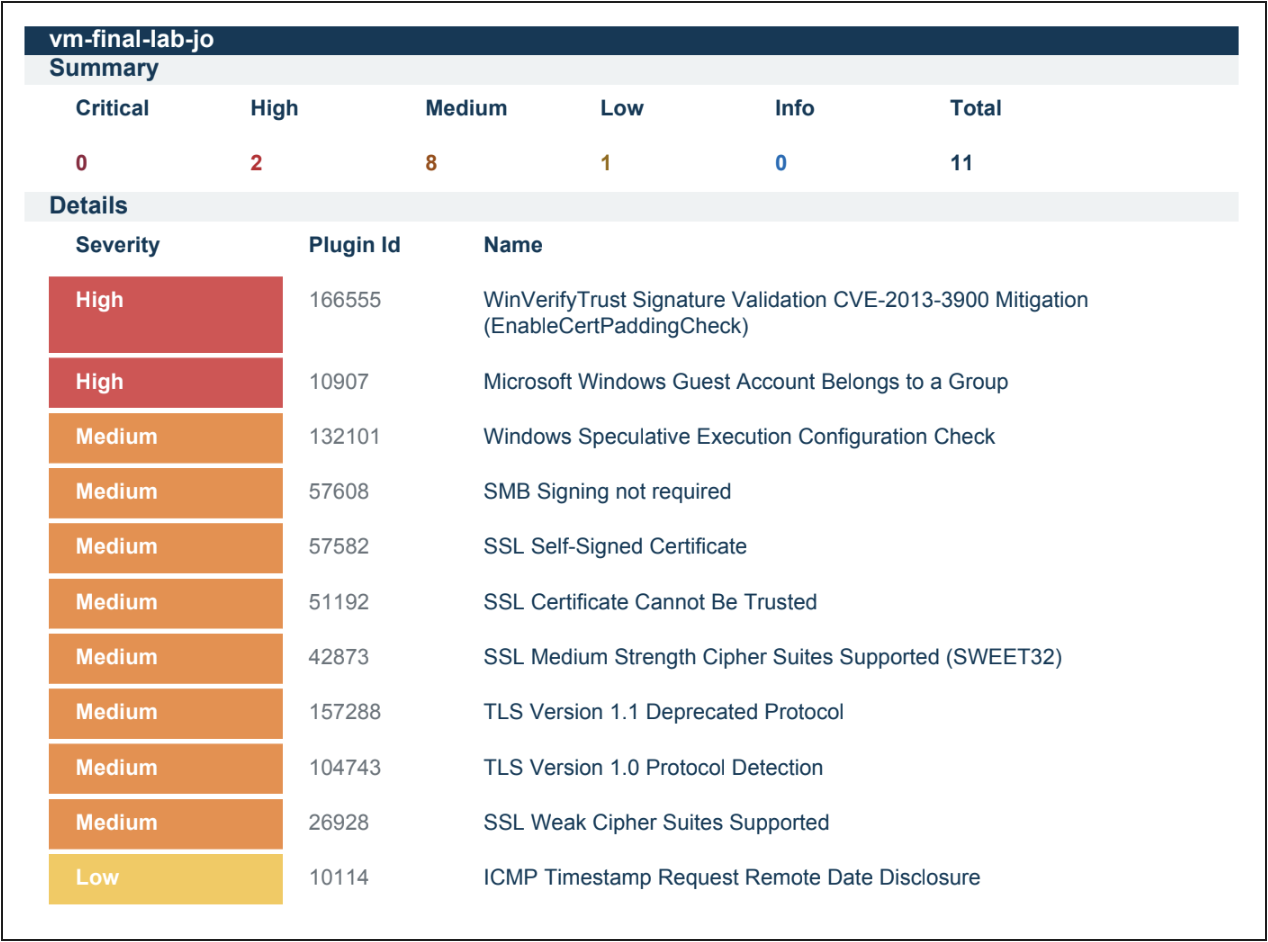
Scan 2 - Third Party Software Removal
The server team used PowerShell scripts to remediate insecure protocols and cipher suites. A follow-up scan verified successful remediation, and the results were saved for reference.
PowerShell: Insecure Protocols Remediation
PowerShell: Insecure Ciphers Remediation

Scan 3 - Ciphersuites and Protocols
The server team removed the guest account from the administrator group. A new scan confirmed remediation, and the results were exported for comparison.
PowerShell: Guest Account Group Membership Remediation

Scan 4 - Guest Account Group Removal
Windows updates were re-enabled and applied until the system was fully up to date. The scan showed no changes to vulnerabilities.
The server team used a PowerShell script to remove CVE-2013-3900. A follow-up scan confirmed successful remediation.
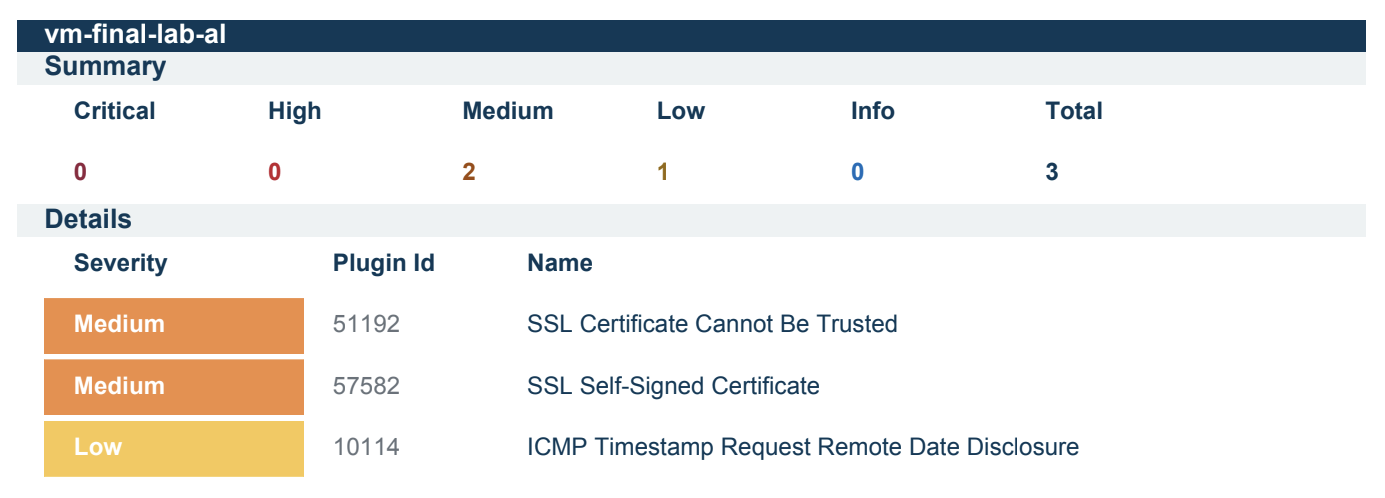
PowerShell: CVE-2013-3900 Remediation
The remediation efforts decreased total vulnerabilities by 88%, reducing them from 25 to 3. All critical vulnerabilities were eliminated by the second scan (100% resolution), and high‑severity vulnerabilities were also fully resolved (100% reduction). Medium‑severity vulnerabilities were reduced by 85%. In a production environment, the criticality of assets would play a key role in prioritizing and directing future remediation activities.

After completing the initial remediation cycle, the vulnerability management program transitions into Maintenance Mode. This phase ensures that vulnerabilities continue to be managed proactively, keeping systems secure over time. Regular scans, continuous monitoring, and timely remediation are crucial components of this phase. (See Finalized Policy for scanning and remediation cadence requirements.)
Key activities in Maintenance Mode include:
- Scheduled Vulnerability Scans: Perform regular scans (e.g., weekly or monthly) to detect new vulnerabilities as systems evolve.
- Patch Management: Continuously apply security patches and updates, ensuring no critical vulnerabilities remain unpatched.
- Remediation Follow‑ups: Address newly identified vulnerabilities promptly, prioritizing based on risk and impact.
- Policy Review and Updates: Periodically review the Vulnerability Management Policy to ensure it aligns with the latest security best practices and organizational needs.
- Audit and Compliance: Conduct internal audits to ensure compliance with the vulnerability management policy and external regulations.
- Ongoing Communication with Stakeholders: Maintain open communication with teams responsible for remediation, ensuring efficient coordination.
By maintaining an active vulnerability management process, organizations can stay ahead of emerging threats and ensure long‑term security resilience.